Quote panel
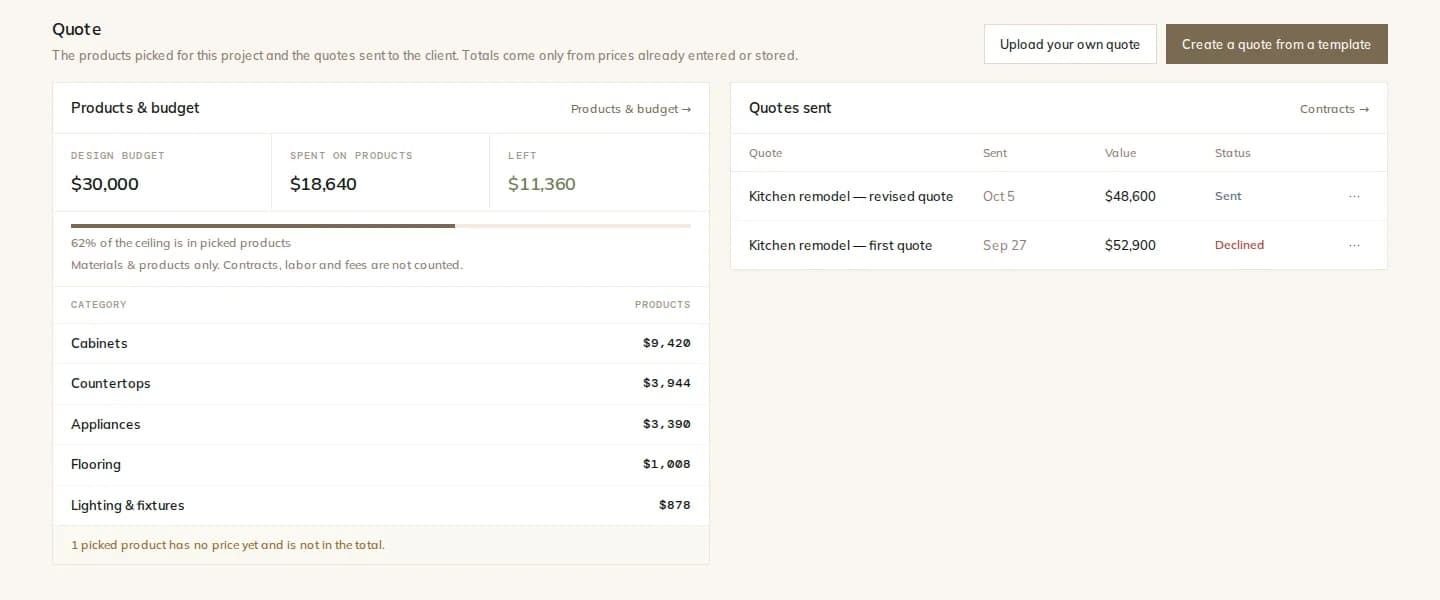
The render's products with images, sizes, quantities and the total.
Price · Quotes
The products in the render are real, so the render can become a quote: products, sizes, quantities and store prices. Write the proposal from your own template with your logo, and send it for signature with the payment schedule attached.
How it works
Open the quote panel beside a render: product images, names, sizes, quantities and a total from stored prices. Send the lines to the material list.
Create a quote from your office template. Your logo, the client, the property and the scope of work fill in by themselves.
Enter the amount and the stage payments. Templates never hold amounts, so every quote is priced on purpose.
The client signs online. The signed payment schedule becomes the project's payments, ready to invoice.
Render-to-quote
A real-products render knows its products. The quote panel lists them with images, sizes and quantities by area, and totals the stored store prices. Products without a price are named, not guessed.
Bring your own
Upload your own quote, estimate, contract or change order. The AI reads it and fills in the form: you check every field, and the document joins the project with its amount and payment schedule as if it had been made in Modula.
What you get
The render's products with images, sizes, quantities and the total.
Quote, contract, change order and scope templates for your whole team.
Upload a PDF you already use as a template; merge fields print after it.
Drafts the template text from your points. It never writes prices.
Read an existing quote or contract into the project.
Signature and date boxes placed, with reminders and a signed PDF for everyone.
The details
FAQ
Works with
Turn the render into a quote and get it signed the same day.